Background screening cases, document intake and client visibility
Hafiz Abdullah Aamir developed background-screening automation projects connecting case pipelines and SLA alerts with consent-aware document intake, extraction, verification requests, report preparation and client status access. The collection supports coordination and visibility across individual checks, while staff retain responsibility for verification, interpretation and report approval.
By Advenno · Project team lead: Hafiz Abdullah Aamir · Published · Updated
Where the work gets stuck.
A background-screening case involves several pieces of work that may depend on different people or institutions. Documents need to be collected, verification requests sent and replies tracked. A case can remain open while one check is still waiting, even when other information is already available. The reporting team needs to understand that state before preparing the final report.
The project focused on coordinating this work as a case pipeline with turnaround-time visibility. It addressed the administrative process around verification rather than presenting document extraction or an automated reply classification as proof that a candidate's information is true.
A system built around the work.
The delivered pipeline brought case intake, document processing, verification requests, reminders and SLA tracking into an internal workflow. It connected the progress of individual checks with the broader case, and it supported report preparation from the gathered results. Document extraction and response handling served the case team rather than replacing its verification work.
Human review remained part of the report process. The collection connected consent and material intake, individual checks and requests, report preparation and client-facing status visibility. A verification request and the information returned in response remain distinct from the final judgement the reviewing team includes in a report.
How the pieces connect.
Start the case
Collect the case information, consent material and supporting documents needed to begin the background-screening workflow.
Coordinate the checks
Send and track verification requests as the case team works through the information required from relevant third parties.
Track progress and follow-ups
Keep outstanding requests and SLA timing visible within the case pipeline so the team can manage the next follow-up.
Prepare the reviewed report
Bring the gathered check results into report preparation, with human review before the findings are used as a completed screening report.
What the project delivered.
The project delivered a case-management capability covering the path from intake to reviewed report preparation. Verification requests, outstanding checks and turnaround tracking became parts of one operational process. The case team's work remains to interpret the check results and review the report, with the workflow supporting the coordination around those decisions.
The systems behind the workflow.
Each module handles a different part of the work. Together, they connect the operational handoffs around this project.
Case pipeline and SLA alerts
The case-management module tracked individual checks within a broader screening assignment. It connected progress, deadlines and follow-up work so officers could see which part of a case still needed attention.
- How it works
Case records and workflow orchestration drive reminders and SLA visibility across the separate checks.
- Operational consideration
Define what starts, pauses and completes a check. An alert can identify delayed work, but it cannot make a third party return a verification response.
Consent, document intake and OCR
Intake connected consent records with document collection and extraction. Degrees, experience letters and identity information became organised inputs for the case team rather than loose attachments.
- How it works
An upload workflow and OCR help structure the information needed to initiate the relevant checks.
- Operational consideration
Document readings require review where uncertain. Consent and access status must be handled as part of the case, not assumed from the presence of a file.
Verification requests and reply classification
The follow-up module prepared requests, scheduled reminders and organised incoming replies. It addressed the coordination involved in waiting on institutions and employers.
- How it works
Email automation and language-model classification assist routing and logging of responses against case activity.
- Operational consideration
A received response may be ambiguous, incomplete or assigned incorrectly. Human review separates message handling from acceptance of a verification finding.
Report generation and QA
Report preparation assembled the results of the checks into a consistent submission. The workflow retained a reviewer between gathered information and the report delivered to a client.
- How it works
Templates use the recorded results; summary assistance can help presentation without inventing findings.
- Operational consideration
The reviewer checks factual accuracy, evidence and unresolved checks. A polished report should not conceal a pending response or suggest that extraction established authenticity.
Client status portal and assistant
The client-service layer supported status enquiries about cases without requiring every update to become a separate telephone call or manual email.
- How it works
Authorised portal access and status assistance read the appropriate case-progress information.
- Operational consideration
A client should see only the cases and information they are authorised to access. Status visibility and permission to view underlying candidate documents are separate decisions.
Inside the system.
Choose a workflow to open the full diagram. Zoom in to follow its decisions and handoffs, or read the stages in the text view.
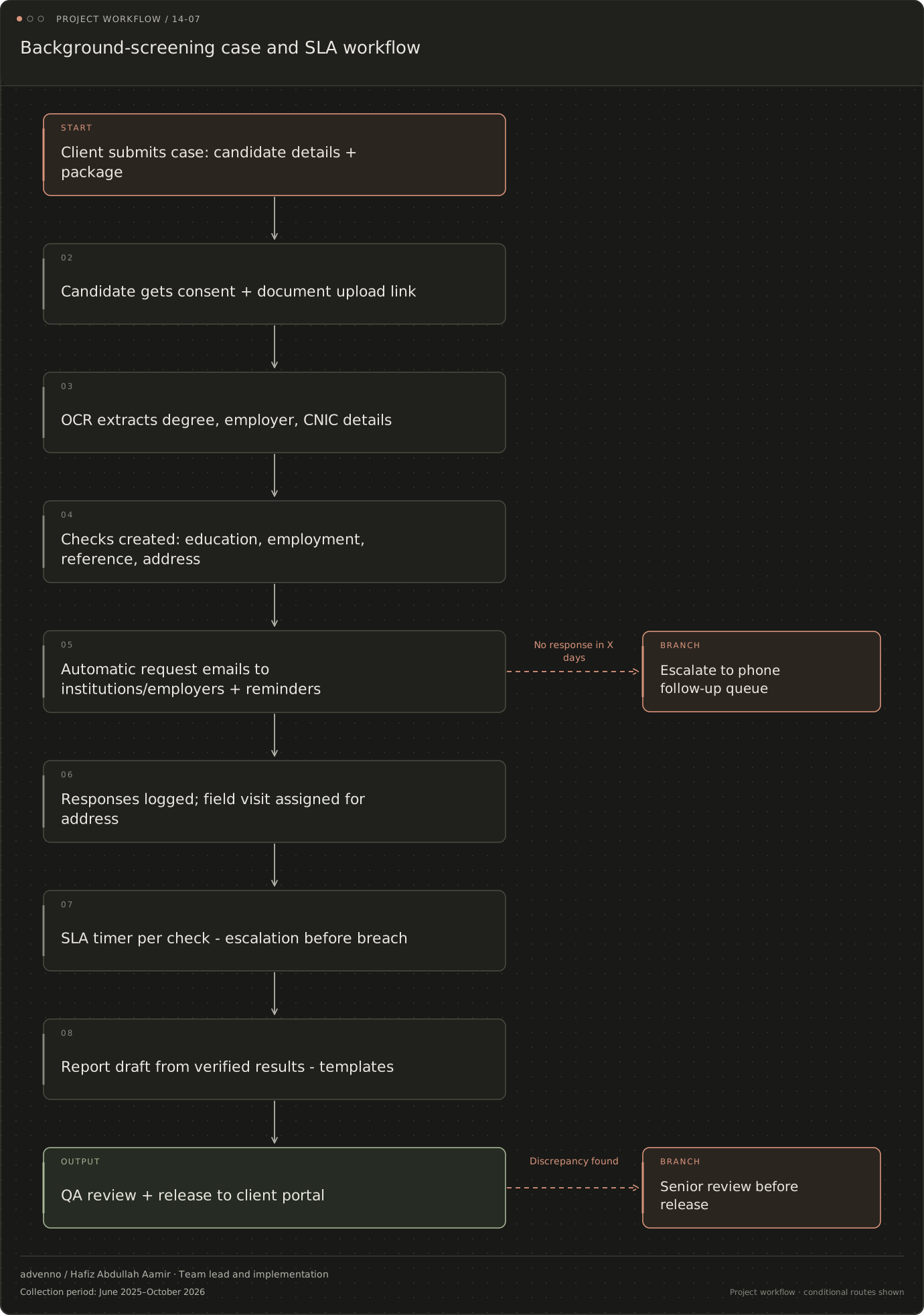
Background-screening case and SLA workflow
The project’s operational flow, including decision points and exception routes. Named channels reflect the original project context; a similar implementation is scoped around your systems.
Read the stages and decision branches
- Client submits case: candidate details + package
- Candidate gets consent + document upload link
- OCR extracts degree, employer, CNIC details
- Checks created: education, employment, reference, address
- Automatic request emails to institutions/employers + reminders
- Responses logged; field visit assigned for address
- No response in X days: Escalate to phone follow-up queue
- Responses logged; field visit assigned for address
- SLA timer per check - escalation before breach
- Report draft from verified results - templates
- QA review + release to client portal
- Discrepancy found: Senior review before release
- Escalate to phone follow-up queue
- Senior review before release
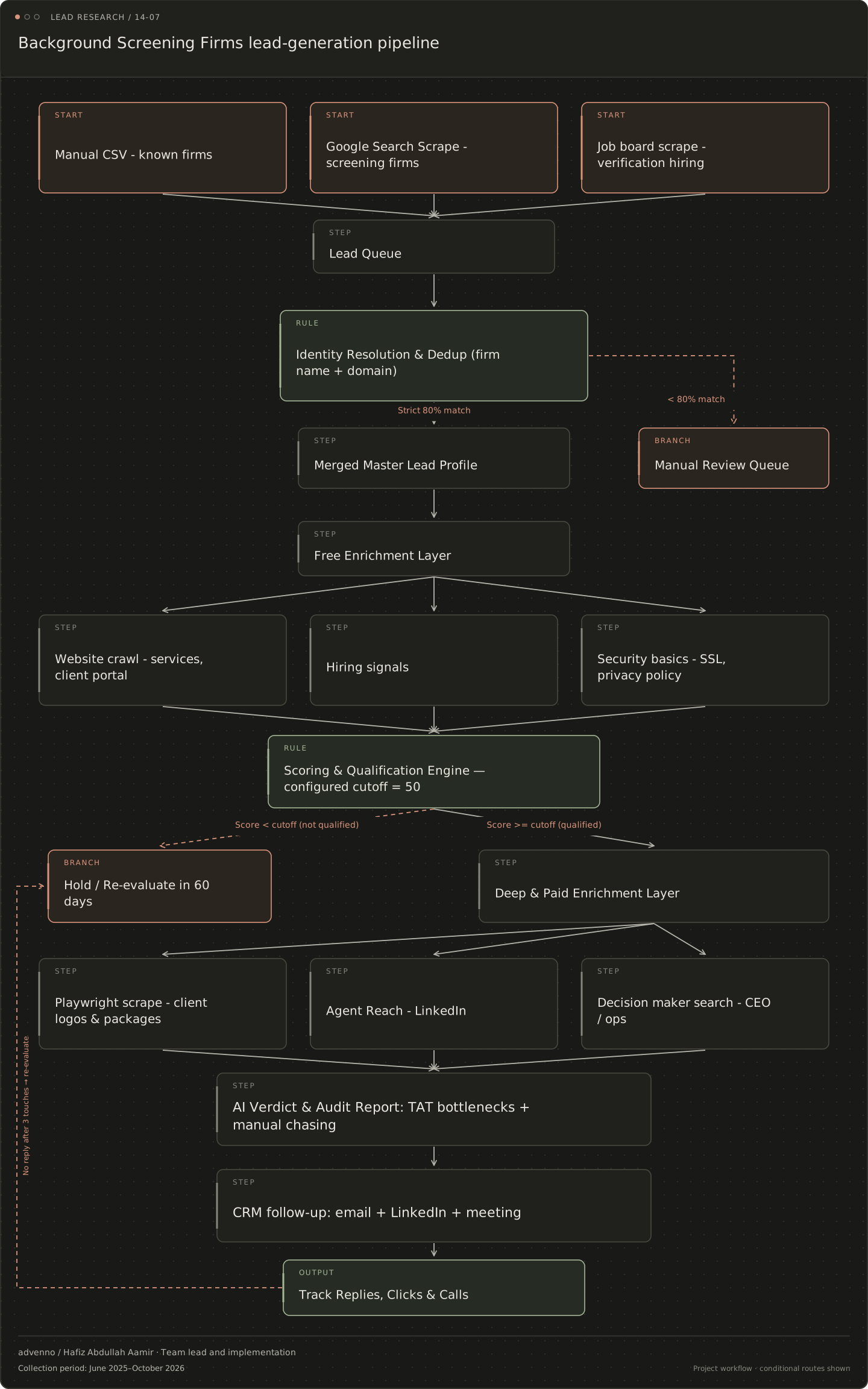
Related acquisition workflow: Background screening firms
A separate lead-research and CRM workflow configured for this business niche. It connects evidence gathering, qualification and follow-up; it is distinct from the operational system shown above.
Read the stages and decision branches
- Manual CSV - known firms
- Google Search Scrape - screening firms
- Job board scrape - verification hiring
- Lead Queue
- Identity Resolution & Dedup (firm name + domain)
- Strict 80% match: Merged Master Lead Profile
- < 80% match: Manual Review Queue
- Merged Master Lead Profile
- Manual Review Queue
- Free Enrichment Layer
- Website crawl - services, client portal
- Hiring signals
- Security basics - SSL, privacy policy
- Scoring & Qualification Engine — configured cutoff = 50
- Score < cutoff (not qualified): Hold / Re-evaluate in 60 days
- Score >= cutoff (qualified): Deep & Paid Enrichment Layer
- Hold / Re-evaluate in 60 days
- Deep & Paid Enrichment Layer
- Playwright scrape - client logos & packages
- Agent Reach - LinkedIn
- Decision maker search - CEO / ops
- AI Verdict & Audit Report: TAT bottlenecks + manual chasing
- CRM follow-up: email + LinkedIn + meeting
- Track Replies, Clicks & Calls
- no reply after 3 touches: Hold / Re-evaluate in 60 days
What makes the system useful.
How does a screening case differ from a single document check?
A background-screening case can contain several parallel checks, each waiting on a different institution, employer or person. The case team needs consent and documents, officers send verification requests, reviewers assess the replies and an account manager keeps the client informed. The project collection connected these roles through case tracking, intake, follow-ups, report preparation and a client status layer.
A case therefore cannot be represented accurately by one undifferentiated done/not-done field. An education request may be outstanding while an employment response has arrived and another check is under review. Overall status needs to reflect those separate pieces of work without implying that every received reply is already verified.
Where does AI assist and where does verification remain human?
The implementation approach used OCR for document intake and assisted classification for incoming email replies. Workflow records and deadlines supported coordination, while report templates brought together the reviewed results. Language-model assistance helps summarise report material; the findings themselves come from the verification work.
This separation is important when a reply is ambiguous or belongs to another case. Parsing helps route information, but the officer checks what it means. Similarly, an extracted degree title is not evidence that the issuing institution confirmed it. Report QA and the organisation's requirements for encryption, access logs and retention remain part of operational acceptance.
What should be checked when evaluating screening automation?
Useful measures include turnaround time, overdue checks, cases handled per officer and report corrections. These are proposed evaluation measures, not achieved figures. The review should also examine whether intake errors or misclassified responses are caught before they affect a final report.
Security and client access are part of operational acceptance. Candidate records and verification findings should only be available to authorised people, and an external processing service needs the organisation's approval. The case-operations workflow supports the responsible team's verification work. Each client engagement still needs its own access, processing and review requirements defined.