Community volunteer, event and donation administration
Hafiz Abdullah Aamir developed community-organisation automation projects connecting volunteer signup, reminders, waitlists and check-in with sponsor reporting, donation records and receipts, and social-content preparation. The collection brings participation and contribution records into the administrative work around a community activity, with reporting grounded in the recorded information.
By Advenno · Project team lead: Hafiz Abdullah Aamir · Published · Updated
Where the work gets stuck.
A community event depends on knowing who intends to help and who is present when the activity takes place. Sign-up information, reminder messages and event-day attendance represent different stages of that commitment. After the event, organisers may also need to describe the activity to a sponsor or supporting organisation.
The project addressed this volunteer journey and the reporting work that follows it. Its focus was the connection between registration, event coordination and the record of what happened. An intended attendance count and a recorded check-in are different pieces of information, and each has a place in the operational process.
A system built around the work.
The completed workflow combined volunteer registration with reminders, waitlist coordination and check-in. It also supported sponsor-report preparation from the event information. These functions followed the same activity from the initial call for volunteers through to the administrative record after the event.
The registration stage collected the information needed to coordinate participation. Reminders and waitlists supported the preparation stage, while check-in established the event-day record. Reporting then used the collected activity information to prepare a sponsor-facing account. The project joined those tasks without treating a generated narrative as a substitute for the underlying event information.
How the pieces connect.
Open volunteer registration
Collect sign-ups for the community activity so the organiser has the participant information needed for event coordination.
Coordinate the expected volunteers
Use reminders and waitlist handling to support the preparation period between registration and the day of the event.
Record event check-in
Capture attendance at the activity to distinguish recorded participation from the earlier expression of interest.
Prepare the event report
Bring the collected event information into the sponsor-report preparation stage following the completed community activity.
What the project delivered.
The project delivered an event-coordination process covering volunteer intake, preparation, attendance and reporting. Organisers could connect the planned activity with the participation recorded on the day and use that information in the sponsor-report stage. The capability provided an operational structure around the event, without equating volunteer attendance with an independently measured social impact.
The systems behind the workflow.
Each module handles a different part of the work. Together, they connect the operational handoffs around this project.
Volunteer sign-up and coordination
The coordination module connected volunteer registration with reminders, reserve places and check-in. It followed participation through preparation and event day instead of leaving the organiser to reconcile separate messages afterwards.
- How it works
Forms, participant records and reusable workflow templates organise the event's reminders, waitlist and attendance steps.
- Operational consideration
Update the record when somebody cancels or the event changes. A confirmed registration remains different from a person actually checking in.
Sponsor-report preparation
Reporting used collected event information to prepare a sponsor-facing account. It helped the organiser move from event records to a readable summary without treating generated prose as the evidence.
- How it works
Recorded counts and reviewed event material feed a narrative draft and document output.
- Operational consideration
Use registration and attendance figures for their actual meanings. Do not inflate participation or claim an unmeasured community outcome because a stronger story sounds more persuasive.
Donation log and receipts
The finance module organised small donations associated with community work and supported receipt preparation. It connected the contribution record with the treasurer's administrative process.
- How it works
Donation forms and a structured ledger provide the inputs for reviewed receipt documents.
- Operational consideration
A pledge or payment screenshot is not necessarily confirmed income. Check the financial evidence before using the record as a completed donation or issuing a receipt.
Social captions and scheduling
The communications module supported draft captions and a publishing schedule for community activity. It provided another way to use approved event information without asking a volunteer to begin every update from scratch.
- How it works
Language-model drafting and a reviewed content schedule organise event-related communication.
- Operational consideration
Use approved information and photographs, preserve participant dignity and check the wording. Scheduling content does not remove responsibility for what becomes public.
Inside the system.
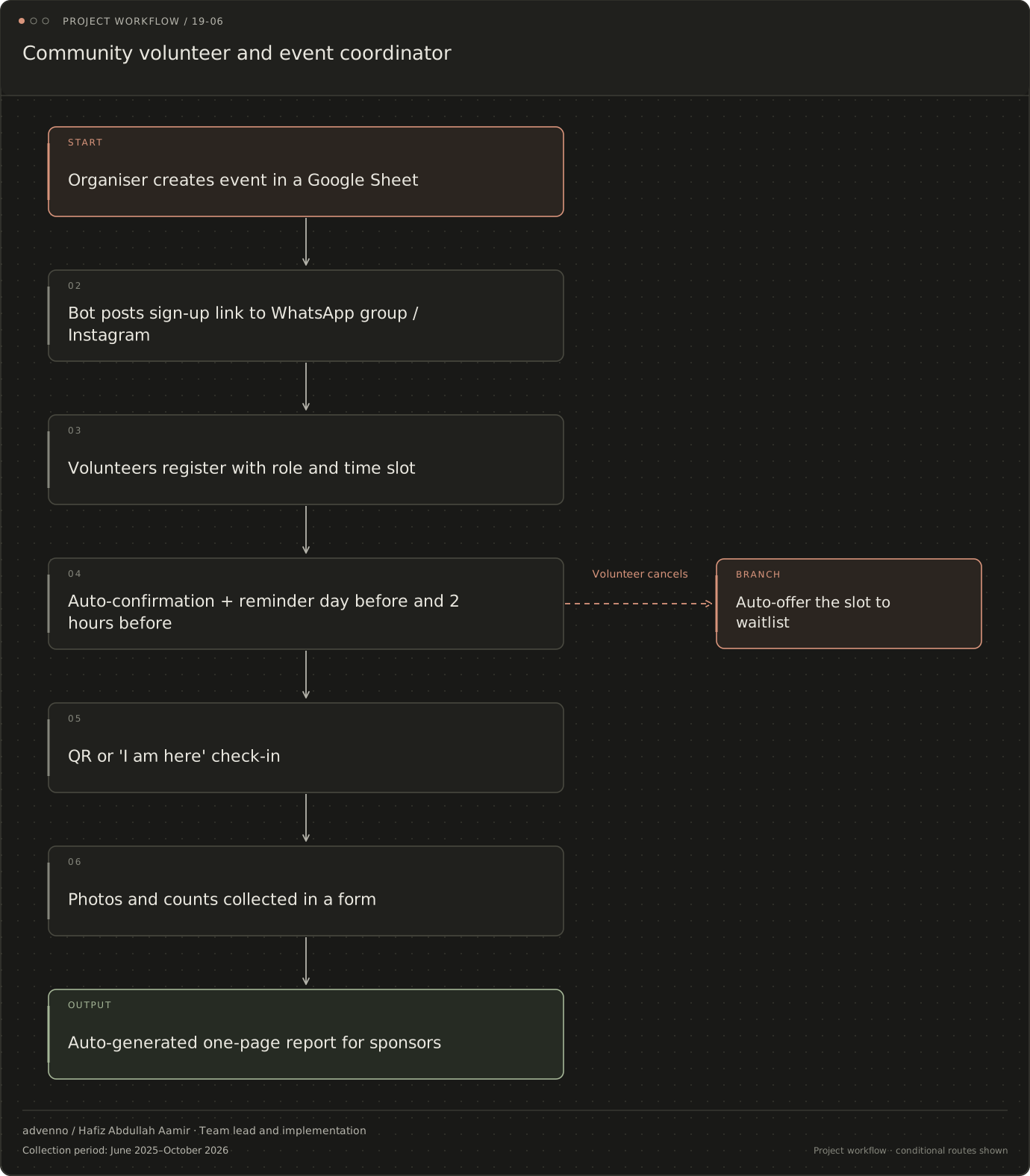
Choose a workflow to open the full diagram. Zoom in to follow its decisions and handoffs, or read the stages in the text view.
Community volunteer and event coordinator
The project’s operational flow, including decision points and exception routes. Named channels reflect the original project context; a similar implementation is scoped around your systems.
Read the stages and decision branches
- Organiser creates event in a Google Sheet
- Bot posts sign-up link to WhatsApp group / Instagram
- Volunteers register with role and time slot
- Auto-confirmation + reminder day before and 2 hours before
- QR or 'I am here' check-in
- Volunteer cancels: Auto-offer the slot to waitlist
- QR or 'I am here' check-in
- Photos and counts collected in a form
- Auto-generated one-page report for sponsors
- Auto-offer the slot to waitlist
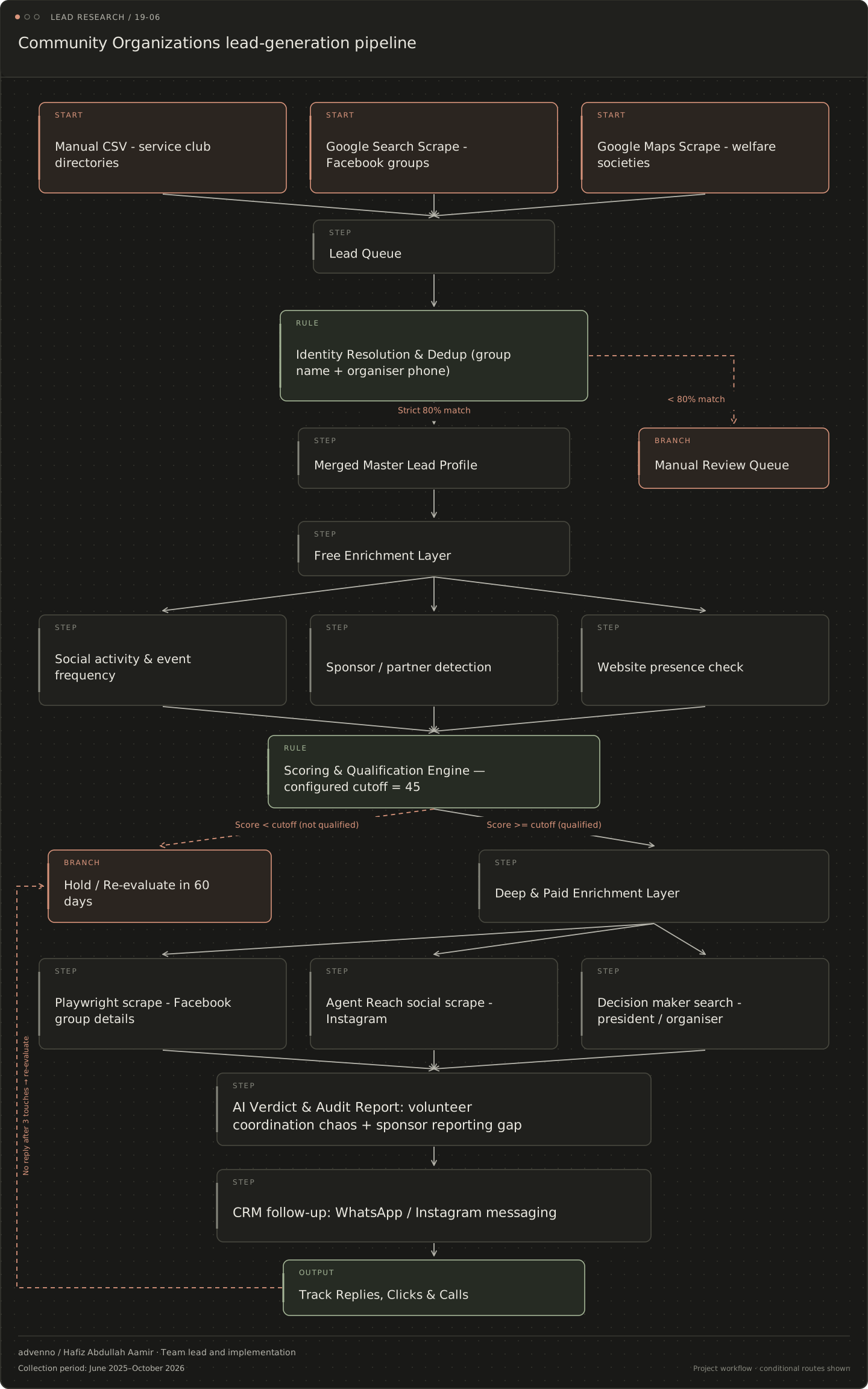
Related acquisition workflow: Community organisations
A separate lead-research and CRM workflow configured for this business niche. It connects evidence gathering, qualification and follow-up; it is distinct from the operational system shown above.
Read the stages and decision branches
- Manual CSV - service club directories
- Google Search Scrape - Facebook groups
- Google Maps Scrape - welfare societies
- Lead Queue
- Identity Resolution & Dedup (group name + organiser phone)
- Strict 80% match: Merged Master Lead Profile
- < 80% match: Manual Review Queue
- Merged Master Lead Profile
- Manual Review Queue
- Free Enrichment Layer
- Social activity & event frequency
- Sponsor / partner detection
- Website presence check
- Scoring & Qualification Engine — configured cutoff = 45
- Score < cutoff (not qualified): Hold / Re-evaluate in 60 days
- Score >= cutoff (qualified): Deep & Paid Enrichment Layer
- Hold / Re-evaluate in 60 days
- Deep & Paid Enrichment Layer
- Playwright scrape - Facebook group details
- Agent Reach social scrape - Instagram
- Decision maker search - president / organiser
- AI Verdict & Audit Report: volunteer coordination chaos + sponsor reporting gap
- CRM follow-up: WhatsApp / Instagram messaging
- Track Replies, Clicks & Calls
- no reply after 3 touches: Hold / Re-evaluate in 60 days
What makes the system useful.
What does a community-event workflow connect?
Volunteer organisers often handle registration, reminders, event-day attendance, donations and sponsor updates around the same activity. This project collection connected those steps and also supported social-content preparation. The aim of the system was to keep the event record usable from the first sign-up through the later explanation of what happened.
A volunteer coordinator needs expected attendance and a waitlist. A treasurer needs donation records. A sponsor needs an account grounded in the actual event. These are related views, but a registration is not proof of attendance and a pledge is not a confirmed donation. The collection preserved those distinctions in the administrative journey.
How can a lightweight system support repeat events?
The implementation approach used forms and participant records with reusable event workflows for reminders, waitlists and check-in. This allowed the basic coordination pattern to be applied to another event without rewriting every step. The event still needed its own dates, people and communication decisions.
After the event, recorded counts supported a sponsor-report draft and approved photographs or captions could support communications. The model's role was to assist the explanation, not manufacture an attendance count or community impact claim. Donation logging and receipt preparation formed a separate financial path, with payment verification where evidence was submitted as an image.
How should organisers evaluate volunteer and reporting automation?
Possible measures include no-show rates, time spent organising an event and the effort required to prepare a sponsor report. These are evaluation categories, not achieved improvements from the project. A good review also checks whether changes to an event or a person's attendance state reach the right communication step.
Volunteer groups can change organisers frequently. Record ownership and the reusable workflow should therefore be understandable to the next person taking over. Participant data, including information about younger volunteers, needs a clear purpose and appropriate access. Public photographs and captions should follow the organisation's consent and review process.