Event venue booking, payments and coordination automation
Hafiz Abdullah Aamir developed event-venue automation projects covering resource availability, site visits, package quotations, payment schedules, vendor and staff checklists, relevant corporate-event communication and post-event feedback. The collection connects the enquiry and shared calendar with the commercial and operational work needed to prepare and follow through on an event.
By Advenno · Project team lead: Hafiz Abdullah Aamir · Published · Updated
Where the work gets stuck.
An event enquiry usually begins with a simple question about a date or price, but turning it into a booking involves several decisions. The venue must establish availability for a hall and time slot, organise a visit, prepare the package and track the advance and later payments. The project addressed the coordination between those steps. A conversation needed to become a usable booking record tied to the shared calendar, rather than remain a sequence of messages alongside separate payment notes.
A system built around the work.
The implementation collected event details and connected the enquiry assistant with availability checking and visit booking. Calendar logic treated the venue resource, date and slot as part of the booking decision. Pricing information supported the package quotation, and the workflow then carried the booking into advance and instalment tracking. The shared calendar and payment schedule gave the conversation operational context: which event the customer was discussing, when it could take place and what payment stage it had reached. Human handling remained part of payment disputes, rather than letting an automated reminder decide a contested financial question.
How the pieces connect.
Capture the event requirements
The enquiry step gathered the customer's event details, giving the venue a starting point for discussing the requested date, space and package within a structured booking process.
Check the calendar resource
Availability was considered against the hall, date and slot in the shared calendar, connecting the customer's request with the actual resource being offered by the venue.
Arrange the site visit
The workflow carried the enquiry into visit booking, linking the customer's next interaction with the venue to the event and availability already under discussion.
Prepare the package quotation
Pricing rules supported a customer-facing package quote, bringing the commercial proposal into the same process as the enquiry, calendar check and planned venue visit.
Track the advance and instalments
The booked event connected to its advance and payment schedule, with reminders supporting follow-up and human handling retained for disputes that required a decision rather than an automated response.
What the project delivered.
The delivered system connected an incoming venue enquiry with calendar-based booking coordination and payment tracking. It supported the sequence from availability and a site visit to a package quote and advance, with later instalments remaining associated with the event. The project gave venue administration a connected booking process rather than an enquiry assistant operating separately from the calendar.
The systems behind the workflow.
Each module handles a different part of the work. Together, they connect the operational handoffs around this project.
Enquiry, availability and site-visit booking
The sales workflow collected event requirements, checked the appropriate hall, date and slot, and carried the conversation towards a site visit. It connected the customer’s initial question with the venue resource rather than treating availability as free-text advice.
- How it works
A WhatsApp or form-based enquiry route connects a shared calendar or structured availability record with visit scheduling.
- Operational consideration
The calendar must be authoritative. Separate staff registers can undermine the workflow even when the assistant itself reads the shared record correctly.
Advances, instalments and receipts
The finance workflow linked an event with its advance, remaining instalments, reminders and receipts. It gave booking administration a record of payment progress within the same event journey.
- How it works
A structured payment schedule, document or receipt output and workflow reminders support follow-up.
- Operational consideration
A reminder is not a decision about a dispute. Human approval and review remain part of contested payments rather than being delegated to automatic messaging.
Package quotation documents
The quotation module used package-pricing information to prepare a customer-facing PDF. It connected menu and service choices with the commercial proposal instead of keeping pricing discussion separate from the booking record.
- How it works
Maintained pricing rules and document generation produce the package quotation.
- Operational consideration
Price information needs updating when offers change. The booking team should be able to identify which current inputs it needs to review when preparing a changed or negotiated quote.
Event-day vendor and staff checklists
The operations module carried the booked event into checklists and alerts for the people delivering it. It made the handoff from sales to event preparation visible in the wider system.
- How it works
Event templates and staff or vendor messaging support preparation and coordination.
- Operational consideration
The team has to adopt and act on the checklist. An alert does not itself establish that equipment arrived or an event task was completed.
Relevant off-season corporate-event communication
The supporting communication module addressed corporate and off-season event opportunities. It kept that activity distinct from booking confirmations and payment reminders, which have a different purpose in the customer relationship.
- How it works
A defined audience and an email or business-channel communication workflow support relevant event offers.
- Operational consideration
Audience suitability and communication preferences matter. Keep offer communication distinct from the messages needed to administer an existing booking or payment.
Post-event review and referral follow-up
The wider workflow included a post-event touchpoint for reviews and referrals. This closed the loop after delivery instead of ending the system’s attention once the final booking payment was recorded.
- How it works
Event completion provides the context for a follow-up communication about feedback or referral.
- Operational consideration
Review and referral messages need to fit the customer relationship and the kind of event delivered. Customer feedback still needs interpretation and a suitable human response.
Inside the system.
Choose a workflow to open the full diagram. Zoom in to follow its decisions and handoffs, or read the stages in the text view.
Event-venue enquiry, booking and payment workflow
The project’s operational flow, including decision points and exception routes. Named channels reflect the original project context; a similar implementation is scoped around your systems.
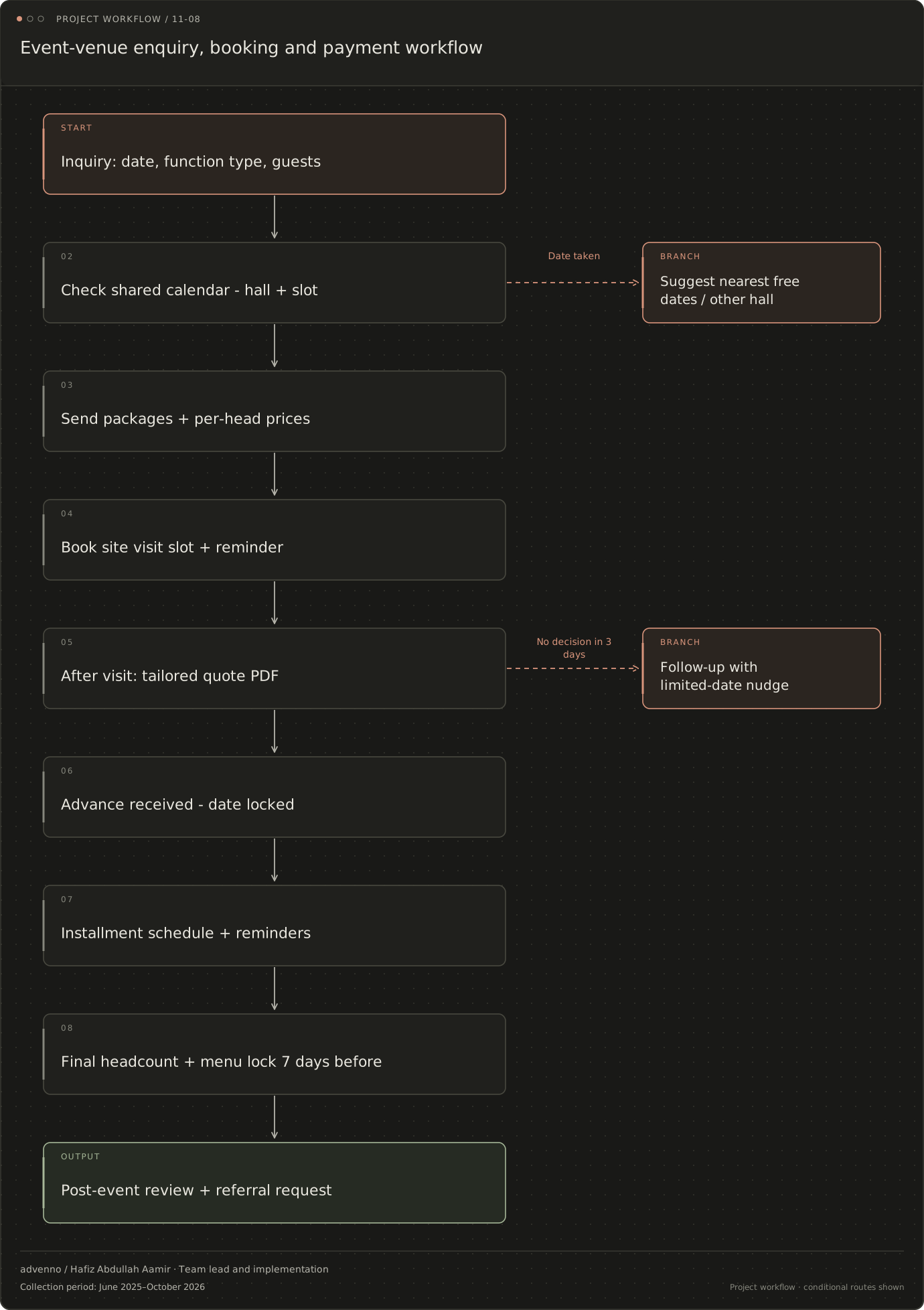
Read the stages and decision branches
- Inquiry: date, function type, guests
- Check shared calendar - hall + slot
- Send packages + per-head prices
- Book site visit slot + reminder
- After visit: tailored quote PDF
- Advance received - date locked
- No decision in 3 days: Follow-up with limited-date nudge
- Advance received - date locked
- Installment schedule + reminders
- Final headcount + menu lock 7 days before
- Post-event review + referral request
- Suggest nearest free dates / other hall
- Follow-up with limited-date nudge
Related acquisition workflow: Event venues
A separate lead-research and CRM workflow configured for this business niche. It connects evidence gathering, qualification and follow-up; it is distinct from the operational system shown above.
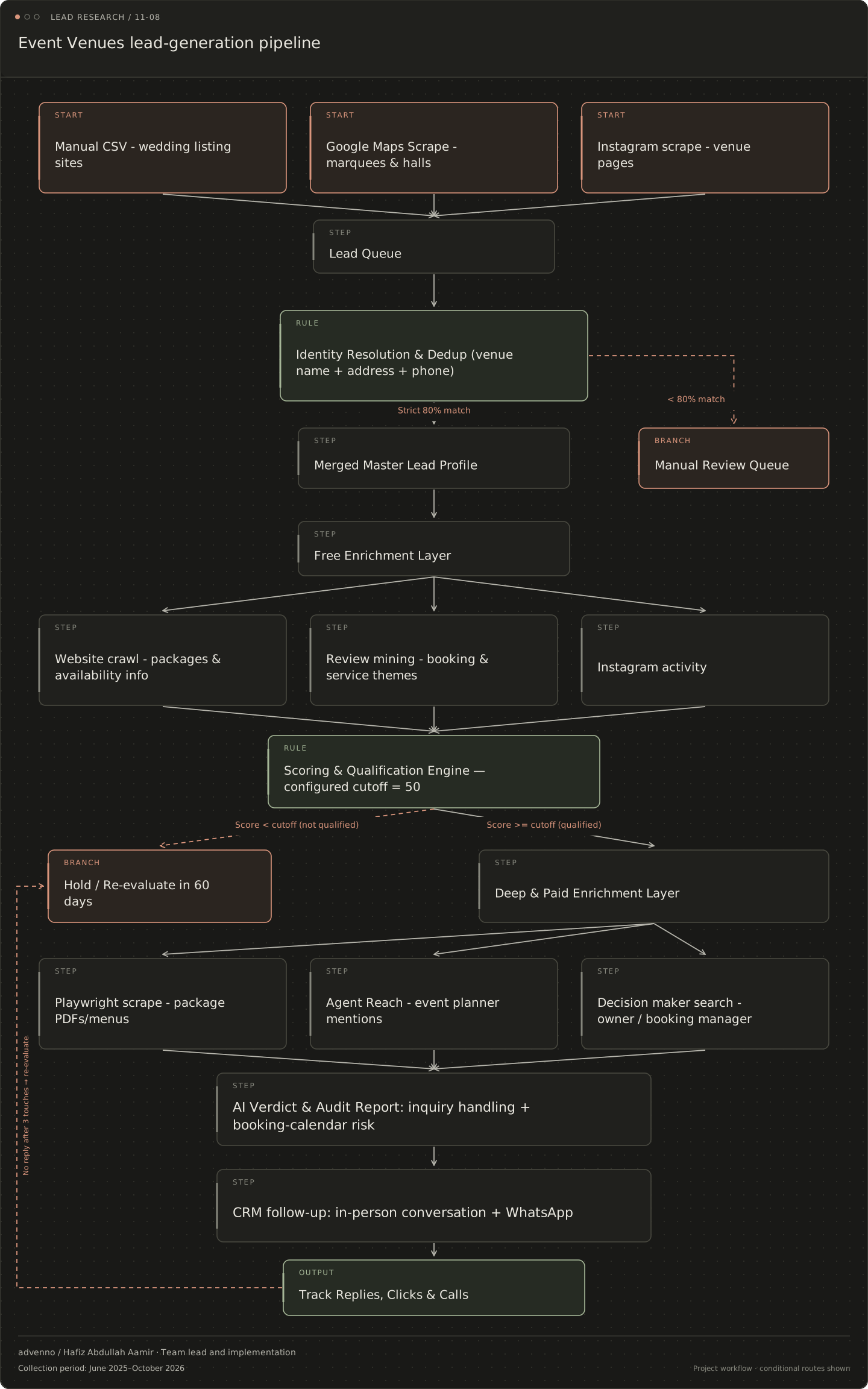
Read the stages and decision branches
- Manual CSV - wedding listing sites
- Google Maps Scrape - marquees & halls
- Instagram scrape - venue pages
- Lead Queue
- Identity Resolution & Dedup (venue name + address + phone)
- Strict 80% match: Merged Master Lead Profile
- < 80% match: Manual Review Queue
- Merged Master Lead Profile
- Manual Review Queue
- Free Enrichment Layer
- Website crawl - packages & availability info
- Review mining - booking & service themes
- Instagram activity
- Scoring & Qualification Engine — configured cutoff = 50
- Score < cutoff (not qualified): Hold / Re-evaluate in 60 days
- Score >= cutoff (qualified): Deep & Paid Enrichment Layer
- Hold / Re-evaluate in 60 days
- Deep & Paid Enrichment Layer
- Playwright scrape - package PDFs/menus
- Agent Reach - event planner mentions
- Decision maker search - owner / booking manager
- AI Verdict & Audit Report: inquiry handling + booking-calendar risk
- CRM follow-up: in-person conversation + WhatsApp
- Track Replies, Clicks & Calls
- no reply after 3 touches: Hold / Re-evaluate in 60 days
What makes the system useful.
A venue booking continues after the advance is collected
Venue enquiries begin with a date or price question, but delivery involves availability, site visits, package selection, payments, vendors and staff. The owner or booking manager needs the commercial view; the coordinator and catering team need the event-day requirements; accounts needs the instalment record. The project collection connected these responsibilities and added post-event feedback and relevant off-season communication. The result was a set of related operating workflows around an event, rather than an enquiry assistant that stopped at a booking link.
Hall, date and slot make the calendar an operating record
Venue availability belongs to a specific resource and time: a hall or lawn, a date and a slot. That record needs to agree with what staff are selling. If an old register remains an independent source, automated answers can conflict with real bookings. Package pricing and PDF quotes form another part of the same commercial journey. Payment schedules then attach the advance and later instalments to the event, while checklists carry the relevant preparation work to staff and vendors.
Evaluate the complete enquiry-to-event journey
Enquiry response time, enquiry-to-visit rate, visit-to-booking rate and booking conflicts are useful evaluation categories. They are not measured outcomes claimed here. Review whether the shared calendar is actually authoritative, whether package prices are current and whether staff act on the event checklist. A reminder does not settle a contested instalment, and a quick answer does not prove that a date is available. The people managing the venue remain responsible for payment disputes, negotiations and practical event coordination.