Restaurant ordering, customer service and operations automation
Hafiz Abdullah Aamir developed restaurant automation projects spanning direct ordering and kitchen handoffs, review response workflows, customer win-back, table reservations, stock and wastage records, preparation planning and voice intake. The collection connects the customer’s request with the operational work around serving the order and maintaining the relationship.
By Advenno · Project team lead: Hafiz Abdullah Aamir · Published · Updated
Where the work gets stuck.
Restaurant ordering spans several kinds of work. A customer may need an answer about a deal before choosing items, adding an address and arranging payment. Meanwhile, the kitchen needs usable order details rather than a conversation that someone must interpret again. The project addressed the handoff between those activities: helping customers complete a direct order, giving operations the information needed to prepare it and communicating the next stage without turning every order into a lengthy chat.
A system built around the work.
The implementation used a conversational entry point for menu and ordering questions, followed by a web ordering step for the structured parts of the transaction. This separated the customer's questions from the task of collecting a complete order. The ordering journey brought together the selected items, delivery details and payment step before handing the order to the kitchen workflow. Customer messaging covered confirmation and the delivery update. The emphasis was on connecting these stages into a usable direct-order process, rather than treating the assistant as a separate channel that created more work for staff.
How the pieces connect.
Answer the ordering question
The conversational entry point handled the customer's initial menu or ordering enquiry and directed them towards the next step in completing a direct order.
Open the web ordering journey
Customers moved into a structured ordering step where item selection and relevant deal choices could be handled together instead of scattered across separate messages.
Collect the order details
The ordering journey brought together the items, address and payment step needed to turn a customer's interest into an order the restaurant could act on.
Hand the order to the kitchen
The completed order flowed into the kitchen handoff, connecting what the customer selected with the information needed by the team preparing the food.
Communicate the order status
Confirmation and the out-for-delivery update formed part of the customer journey, keeping the main operational milestones connected to the original direct order.
What the project delivered.
The delivered capability covered the path from a restaurant enquiry to a kitchen-ready order and customer status updates. Customers had a direct ordering route, and the kitchen handoff used the information collected during that route. The project also kept the detailed ordering interaction in a web journey, with messaging used for questions and key updates.
The systems behind the workflow.
Each module handles a different part of the work. Together, they connect the operational handoffs around this project.
Direct ordering and kitchen handoff
The ordering module connected customer questions with a web cart and the kitchen. Detailed choices stayed in the cart, while messaging handled the initial enquiry, confirmation and out-for-delivery update. This kept a restaurant order attached to usable operational details rather than a long message thread.
- How it works
A messaging API, workflow orchestration, structured cart and order store form the design, with webhooks or a kitchen-facing interface at the POS boundary.
- Operational consideration
The integration must match the restaurant’s available systems. Payment and address details belong to the structured transaction, and message volume is an operating-cost consideration.
Review replies and quality alerts
Review analysis identified sentiment and recurring topics such as delays or poor service. Alerts drew attention to negative experiences, while response drafting helped prepare replies in the restaurant’s approved tone. The module connected reputation work with actual service feedback.
- How it works
Topic classification and sentiment analysis feed an alert and reply-drafting workflow, with approval before customer-facing responses are used.
- Operational consideration
An owner-approved tone prevents automatic replies from becoming generic or inappropriate. An alert identifies an issue to examine; it does not establish who caused it.
Opted-in customer win-back
The retention module organised previous customers into groups for relevant offers and return-visit communication. It made follow-up a distinct workflow after the order rather than treating every customer update as an opportunity to send a promotion.
- How it works
Customer records and segmentation supply scheduled WhatsApp-template or SMS communication, separate from operational confirmations.
- Operational consideration
The audience must have agreed to promotional contact. Message cost, relevance and frequency need consideration so that a return-visit offer remains useful to the customer.
Table reservations and reminders
Table booking connected an incoming request with a reservation record and reminder. This supported the dine-in side of the restaurant alongside delivery ordering, with its own calendar context and staff responsibility for the booking.
- How it works
A booking assistant connects to a calendar or structured reservation store and schedules the relevant reminder.
- Operational consideration
Reservation information has to stay current when staff change bookings. Changes and cancellations need to reach the same record used to prepare the reminder.
Stock, wastage and preparation planning
The operations work included daily stock and wastage logging, reorder alerts and preparation planning from weekday and time patterns. These records gave the kitchen a basis for reviewing quantities instead of relying only on incoming sales messages.
- How it works
Forms and structured records support replenishment rules; historical demand supplies the input for a simple preparation forecast.
- Operational consideration
Staff need to enter usable stock and wastage data. The kitchen reviews the forecast alongside its current stock, wastage records and practical preparation requirements.
Voice order intake
Voice order-taking was another customer entry route in the project collection. It addressed spoken requests during busy periods, distinct from the messaging-to-cart journey. The important handoff remained turning what the customer said into an order the restaurant could review and act on.
- How it works
A voice interface handles speech and conversational order capture before passing the request into the ordering process.
- Operational consideration
Speech recognition quality, especially for Urdu requests and menu names, and the cost of call handling are implementation considerations. Menu names and the kinds of spoken requests customers make deserve particular attention during evaluation.
Inside the system.
Choose a workflow to open the full diagram. Zoom in to follow its decisions and handoffs, or read the stages in the text view.
Restaurant direct ordering and kitchen handoff
The project’s operational flow, including decision points and exception routes. Named channels reflect the original project context; a similar implementation is scoped around your systems.
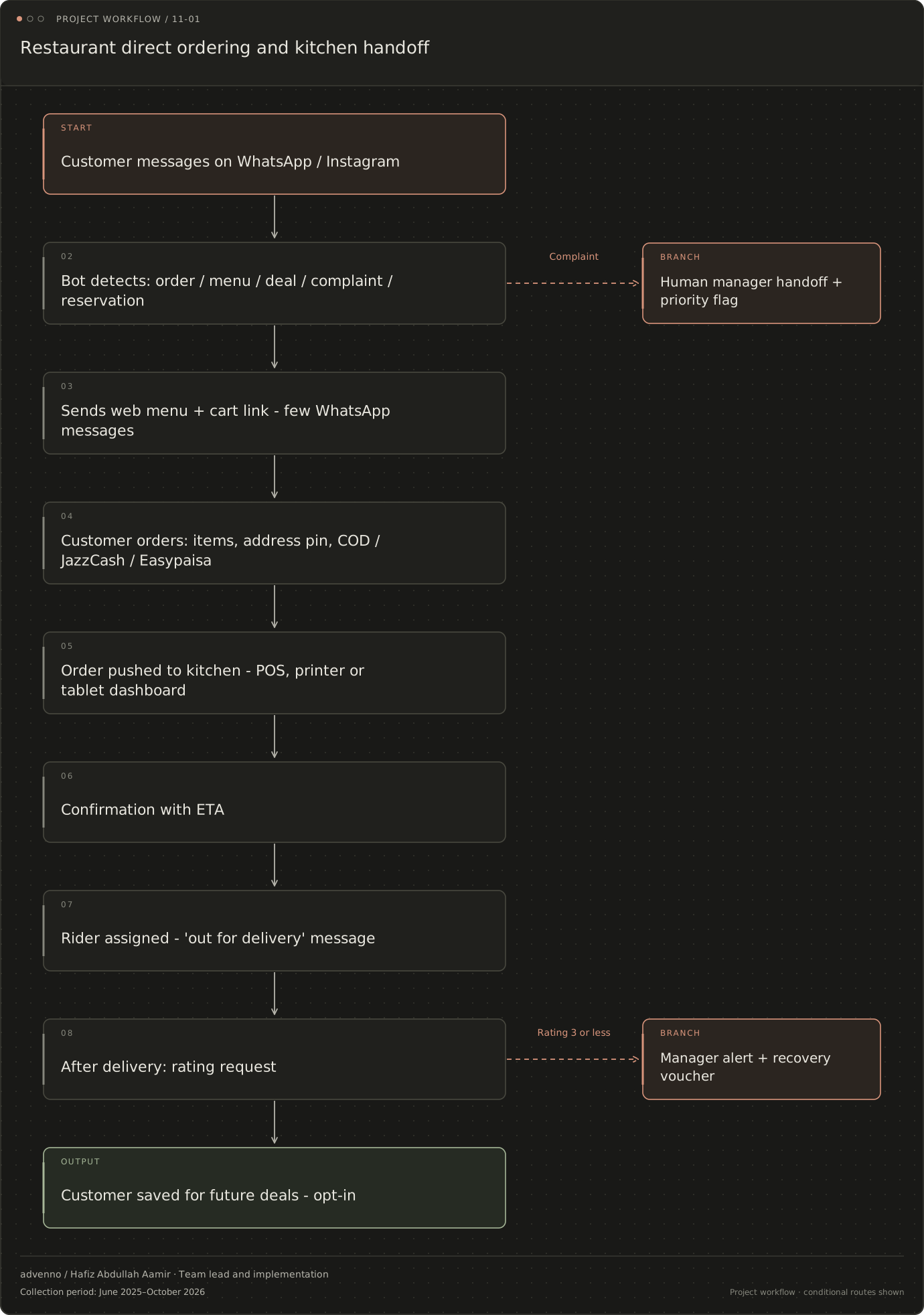
Read the stages and decision branches
- Customer messages on WhatsApp / Instagram
- Bot detects: order / menu / deal / complaint / reservation
- Sends web menu + cart link - few WhatsApp messages
- Customer orders: items, address pin, COD / JazzCash / Easypaisa
- Order pushed to kitchen - POS, printer or tablet dashboard
- Confirmation with ETA
- Rider assigned - 'out for delivery' message
- After delivery: rating request
- Customer saved for future deals - opt-in
- Rating 3 or less: Manager alert + recovery voucher
- Customer saved for future deals - opt-in
- Human manager handoff + priority flag
- Manager alert + recovery voucher
Related acquisition workflow: Restaurants
A separate lead-research and CRM workflow configured for this business niche. It connects evidence gathering, qualification and follow-up; it is distinct from the operational system shown above.
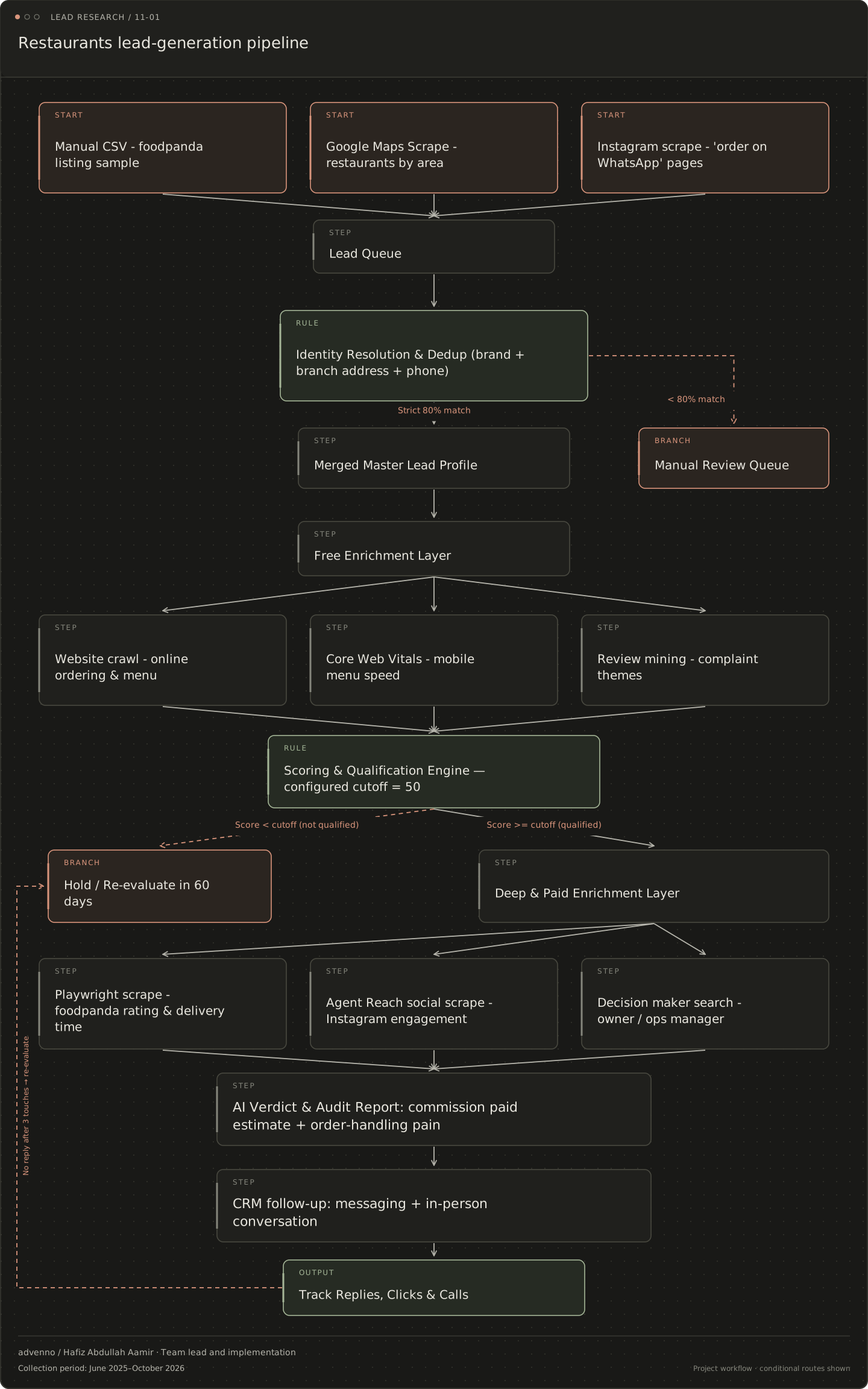
Read the stages and decision branches
- Manual CSV - foodpanda listing sample
- Google Maps Scrape - restaurants by area
- Instagram scrape - 'order on WhatsApp' pages
- Lead Queue
- Identity Resolution & Dedup (brand + branch address + phone)
- Strict 80% match: Merged Master Lead Profile
- < 80% match: Manual Review Queue
- Merged Master Lead Profile
- Manual Review Queue
- Free Enrichment Layer
- Website crawl - online ordering & menu
- Core Web Vitals - mobile menu speed
- Review mining - complaint themes
- Scoring & Qualification Engine — configured cutoff = 50
- Score < cutoff (not qualified): Hold / Re-evaluate in 60 days
- Score >= cutoff (qualified): Deep & Paid Enrichment Layer
- Hold / Re-evaluate in 60 days
- Deep & Paid Enrichment Layer
- Playwright scrape - foodpanda rating & delivery time
- Agent Reach social scrape - Instagram engagement
- Decision maker search - owner / ops manager
- AI Verdict & Audit Report: commission paid estimate + order-handling pain
- CRM follow-up: messaging + in-person conversation
- Track Replies, Clicks & Calls
- no reply after 3 touches: Hold / Re-evaluate in 60 days
What makes the system useful.
The restaurant workflow extends beyond taking an order
The restaurant projects covered the work around dine-in, takeaway and delivery: customer questions, order entry, kitchen handoffs, rider updates, reviews, table bookings and stock records. The owner or operations manager needed a view across those activities, while the order-taking team, kitchen and marketing staff each handled a different part. Connecting these roles matters because a correct order still needs preparation, communication and follow-through. The wider work therefore included customer retention, reputation and operational records alongside the direct-ordering journey.
Structured transactions, conversational assistance and operational records
WhatsApp provided a conversational entry point for menu questions, but the web cart carried the structured transaction: selected items, deals, address and payment. Intent classification helped route messages in Urdu, Roman Urdu and English. Kitchen integration was a separate boundary, dependent on the available POS interface; a kitchen dashboard or printer handoff was a practical alternative where an API was unavailable. Review analysis, stock logs and reservations served their own operational purposes instead of being forced into the order-taking conversation.
How this restaurant system can be evaluated
A useful evaluation follows the complete service journey. Count direct orders and their share of ordering channels, then inspect order errors, response time and review-response coverage. Stock and wastage records provide a separate baseline for preparation planning. These are measurement categories for evaluating the system, not reported improvements from this project. Reviews also need interpretation: a faster reply does not prove that food preparation or delivery improved. Staff adoption and the quality of order and stock inputs determine what the records can meaningfully show.