Staffing attendance, payroll and workforce coordination automation
Hafiz Abdullah Aamir developed staffing automation projects covering attendance intake, payroll and payslip preparation, client invoicing, replacement coordination and document-expiry reminders. The collection connects activity at the client site with payroll, accounts and workforce administration, preserving separate worker-pay and client-billing responsibilities.
By Advenno · Project team lead: Hafiz Abdullah Aamir · Published · Updated
Where the work gets stuck.
For a staffing business, attendance information has two important destinations: the worker's payroll and the client's invoice. Those records begin with activity at a client site, where hours, attendance and changes need to be captured before office staff can prepare the corresponding financial documents. A gap between the operational record and the office process creates work for both teams.
This project focused on connecting those stages. It treated attendance as the starting point for a wider administrative workflow, rather than an isolated check-in feature. The central business question was how the same operational information could carry through to payroll and client billing.
A system built around the work.
The completed system connected attendance capture, payroll preparation and client invoice generation. The attendance stage supplied the operational information needed for the following calculations and documents. Payroll and invoicing then used that information for their respective purposes: preparing worker-pay outputs and preparing the staffing client's bill.
The project joined work that otherwise sits across site coordination, payroll administration and accounts. Attendance is the common input, while worker-pay preparation and client invoicing are separate outputs with different administrative purposes. Attendance-to-payment-and-billing formed the central workflow, with replacement coordination and worker document-expiry reminders supporting the wider staffing operation.
How the pieces connect.
Capture attendance
Collect attendance information from staffing activity so it can become an input to the office-side payroll and billing process.
Prepare the payroll output
Use the attendance information within the payroll stage to prepare the worker-pay calculation and associated payroll documents.
Prepare the client invoice
Carry the staffing activity into the invoicing stage to produce the corresponding bill for the client receiving the staff.
Connect the administrative handoff
Keep attendance, payroll preparation and client invoicing connected as parts of the staffing operation rather than unrelated tasks.
What the project delivered.
The project delivered a connected route from staffing attendance to payroll and customer billing. It brought the operational record and its financial uses into the same workflow, providing a basis for preparing worker-pay documents and client invoices. The important handoff is the use of recorded staffing activity in both the worker-payment process and the customer's bill.
The systems behind the workflow.
Each module handles a different part of the work. Together, they connect the operational handoffs around this project.
Location-aware attendance intake
Attendance capture connected worker check-in with the staffing operation. The workflow covered messaging-based intake and a simple web check-in alternative, with site/location information available for validation where appropriate.
- How it works
A check-in workflow stores worker and site activity, with geofence checks as an optional validation mechanism.
- Operational consideration
Shared phones, inaccurate location and connectivity problems need exceptions. Optional selfie matching adds personal-data considerations and is not necessary for every deployment.
Payroll and payslip preparation
Payroll preparation used the recorded staffing activity to produce worker-pay information and payslips. Overtime, leave and deductions belong to an explicit calculation process instead of informal interpretation of messages.
- How it works
A rules engine computes the configured amounts; document templates produce the payslip output for review.
- Operational consideration
The responsible payroll professional must approve calculation rules and changes. A generated payslip does not prove that every underlying attendance entry is correct.
Client invoice preparation
The invoicing module used staffing activity for the customer's bill. It connected the work recorded at a client site with the appropriate billing template and rates, rather than re-keying the same attendance information.
- How it works
Client-specific rate rules and invoice templates are orchestrated around approved attendance records.
- Operational consideration
Client rates and worker-pay rates can differ. Keep those calculations distinct, including any review needed before an invoice leaves the accounts team.
Replacement coordination
Replacement requests formed an operational workflow alongside the monthly financial process. The coordinator could work from a worker pool and availability information when a client site needed another person.
- How it works
A request workflow connects the affected assignment with available-worker records and location information where relevant.
- Operational consideration
Availability changes quickly. A suggested worker is not a confirmed replacement until the coordinator and worker complete the assignment process.
Document-expiry reminders
The document module organised dates for contracts and screening-related records. It helped bring approaching renewal work into the staffing team's routine rather than leaving expiry dates in separate files.
- How it works
Dated records drive scheduled reminders to the people responsible for renewal or follow-up.
- Operational consideration
A reminder only highlights a date. It does not certify that a document is valid, a renewal is complete or the business meets every applicable obligation.
Inside the system.
Choose a workflow to open the full diagram. Zoom in to follow its decisions and handoffs, or read the stages in the text view.
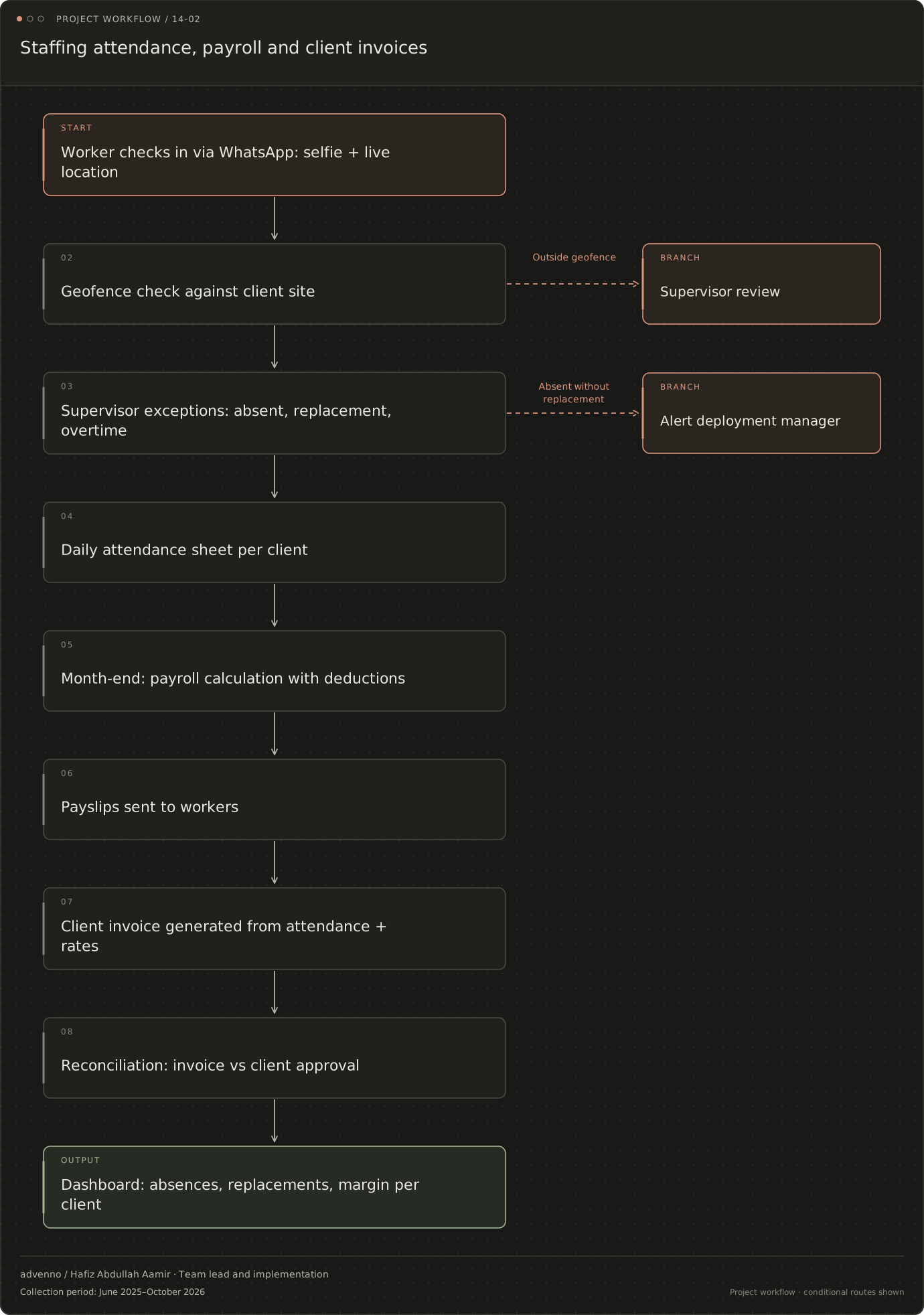
Staffing attendance, payroll and client invoices
The project’s operational flow, including decision points and exception routes. Named channels reflect the original project context; a similar implementation is scoped around your systems.
Read the stages and decision branches
- Worker checks in via WhatsApp: selfie + live location
- Geofence check against client site
- Supervisor exceptions: absent, replacement, overtime
- Outside geofence: Supervisor review
- Supervisor exceptions: absent, replacement, overtime
- Daily attendance sheet per client
- Absent without replacement: Alert deployment manager
- Daily attendance sheet per client
- Month-end: payroll calculation with deductions
- Payslips sent to workers
- Client invoice generated from attendance + rates
- Reconciliation: invoice vs client approval
- Dashboard: absences, replacements, margin per client
- Supervisor review
- Alert deployment manager
Related acquisition workflow: Staffing firms
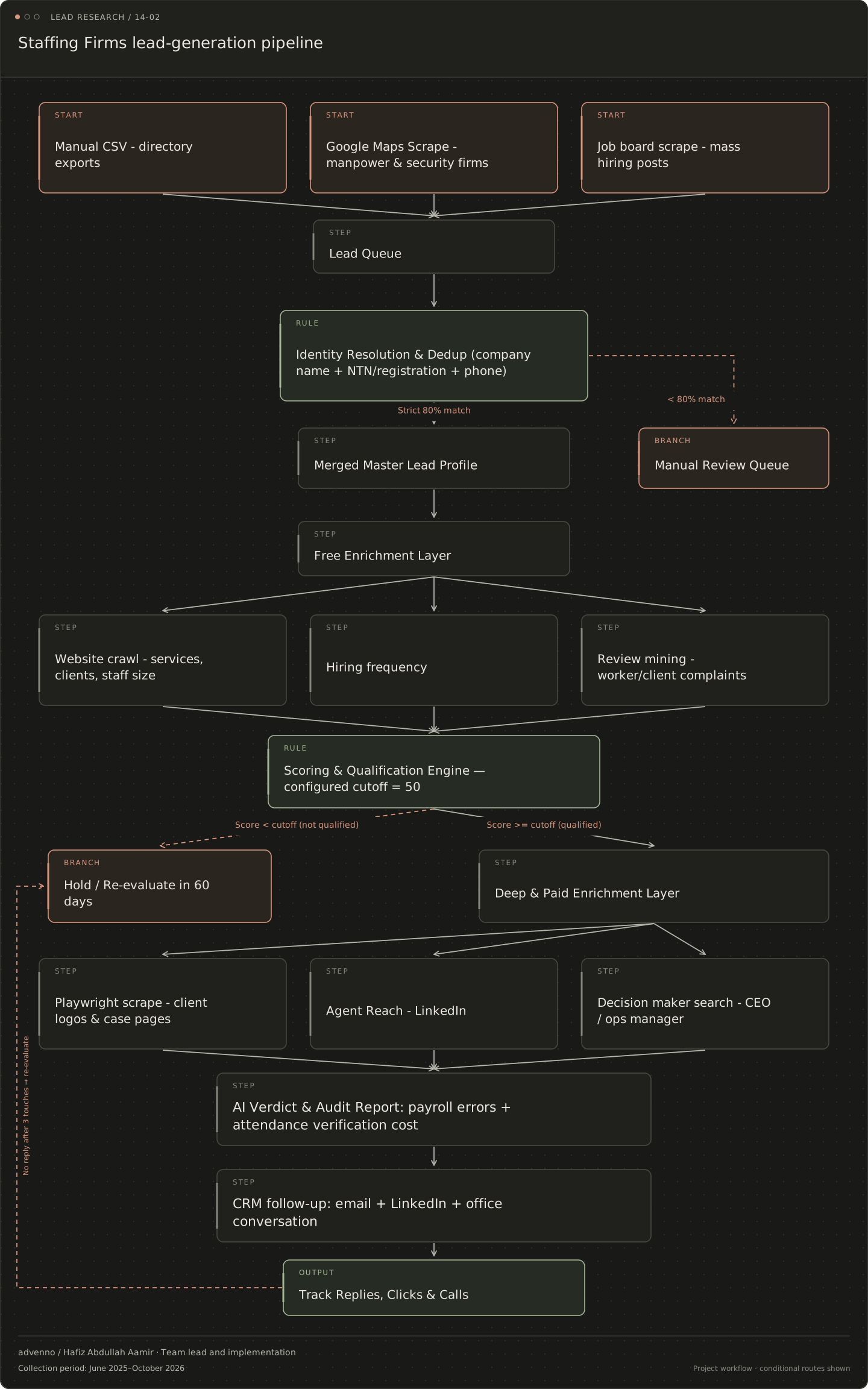
A separate lead-research and CRM workflow configured for this business niche. It connects evidence gathering, qualification and follow-up; it is distinct from the operational system shown above.
Read the stages and decision branches
- Manual CSV - directory exports
- Google Maps Scrape - manpower & security firms
- Job board scrape - mass hiring posts
- Lead Queue
- Identity Resolution & Dedup (company name + NTN/registration + phone)
- Strict 80% match: Merged Master Lead Profile
- < 80% match: Manual Review Queue
- Merged Master Lead Profile
- Manual Review Queue
- Free Enrichment Layer
- Website crawl - services, clients, staff size
- Hiring frequency
- Review mining - worker/client complaints
- Scoring & Qualification Engine — configured cutoff = 50
- Score < cutoff (not qualified): Hold / Re-evaluate in 60 days
- Score >= cutoff (qualified): Deep & Paid Enrichment Layer
- Hold / Re-evaluate in 60 days
- Deep & Paid Enrichment Layer
- Playwright scrape - client logos & case pages
- Agent Reach - LinkedIn
- Decision maker search - CEO / ops manager
- AI Verdict & Audit Report: payroll errors + attendance verification cost
- CRM follow-up: email + LinkedIn + office conversation
- Track Replies, Clicks & Calls
- no reply after 3 touches: Hold / Re-evaluate in 60 days
What makes the system useful.
Which staffing roles share the same attendance information?
Site supervisors, deployment coordinators, payroll officers and accounts teams use the same staffing activity for different purposes. A supervisor needs to know who arrived. Payroll needs approved hours, leave and overtime. Accounts needs the client's billing rules. The wider project collection connected these handoffs and also covered replacement requests and document-expiry reminders.
This is why attendance capture cannot be treated as an isolated form. A check-in becomes useful when it relates to a worker, a site, an assignment and the later review of working time. The payroll calculation and the customer invoice share that foundation, but they are not the same financial calculation.
Where does the staffing workflow use rules rather than AI?
The core financial path used rules for payroll and invoice preparation. Approved attendance feeds worker-pay calculations and client-specific billing separately, followed by payslips and invoices. Location-aware check-in and anomaly detection support attendance review. Selfie matching is optional; the choice of identity or location checks depends on the staffing operation and its handling requirements.
For an adaptation, the practical design decisions include how workers check in when phones are shared, what happens if a location reading is wrong and who resolves disputed hours. Applicable payroll rules require review by the responsible payroll or accounting professional rather than interpretation by a language model.
How should attendance-to-payroll automation be evaluated?
Payroll processing time, attendance disputes, invoice collection timing and site-coverage gaps are useful evaluation measures. They are evaluation categories, not recorded improvements from this project. A review should also compare outputs against approved attendance and the agreed worker/client rates.
An adoption check is to run the new payroll process alongside the existing calculation before depending on it. That comparison can reveal incorrect rates, missing attendance and exceptional overtime cases. Replacement coordination has a different check: whether the worker-pool information is current enough for a coordinator to make a reliable assignment.