Start with evidence, then decide what a lead means
A lead-research automation system connects business discovery, duplicate checks, enrichment, qualification and reviewed outreach. Its useful output is a prospect record with evidence, a clear next action and an owner. A generated paragraph alone does not tell a sales team whether the business is relevant or whether the contact information is current.
Hafiz Abdullah Aamir’s project collection includes a shared acquisition pipeline with versions for hospitality, recruitment and nonprofit organisations. This guide explains its architecture and the decisions involved in adapting it. The acquisition maps sit alongside the operational diagrams in the project library; they are separate systems with different purposes.
The common starting problem is fragmented research: a business appears in a directory, a website reveals a possible operational gap, another spreadsheet contains an earlier conversation, and nobody can tell whether the prospect has already been reviewed. The pipeline connects those pieces without treating every scraped field or AI inference as established fact.
Resolve identity before enriching another duplicate
Start with permitted sources or an existing CSV export. Keep the source, discovery time, business name, website and available contact identifiers together. A queue makes pending work visible and allows an incomplete record to wait without disappearing.
Normalise phone numbers and website domains before comparing records. Fuzzy name matching can propose possible duplicates, but a similar trading name may refer to a different branch or organisation. Uncertain matches need review. A merge should preserve the useful evidence and history from both records rather than silently discarding one.
This matters when later activity is attached to the prospect. Research, an earlier reply and an opt-out should remain associated with the correct business or contact. More enrichment is not useful if it creates another copy that the sales team mistakes for a new opportunity.
Spend deeper research effort only where it helps
The shared design separates an initial enrichment pass from a more detailed one. The first pass gathers available website and business signals. Configured rules then decide whether the record deserves deeper investigation, belongs in a later review queue or is outside the intended audience.
Qualification rules should be visible. A restaurant’s ordering journey, a staffing firm’s candidate-intake process and a charity’s donation journey are different signals. Applying one universal score can hide those differences. The niche diagrams show how the common structure was adapted around each business type.
A score is a routing rule, not proof that a company needs a particular service or can afford it. Missing data should be distinguishable from a negative finding. A failed website check, for example, may be a temporary technical problem rather than evidence that the business has no working site.
Use AI for interpretation and rules for calculation
The architecture gives code responsibility for normalisation, counts, comparisons and configured scoring. AI assists with interpreting messy text and drafting a concise account of the evidence. Keeping those responsibilities separate makes the result easier to inspect.
A useful research note distinguishes three things: the observed signal, the possible operational implication, and the question that would confirm it. “The public enquiry journey asks for several details in free text” is an observation. “Staff may need to re-enter those details” is a hypothesis. The prospect still needs to confirm what happens behind the form.
Require the draft to retain the source for important claims. When information is unavailable, the system should say so. Fluent wording cannot establish that a business uses a certain CRM, loses a particular amount of revenue or wants an automated replacement for its current process.
Make the CRM handoff reviewable
A qualified record moves into the CRM with its evidence, classification and proposed next action. Outreach drafts should explain a relevant problem without inventing an audit finding or a relationship with the prospect. Someone needs to approve the audience, channel, message and follow-up rules before a campaign begins.
Keep opt-outs and reply states visible to the workflow. A response should change the next action; it should not remain buried in an inbox while an unrelated sequence continues. An interested reply, a request for more information and a refusal require different handling.
Data-source permissions and communication requirements vary by channel and market. The technical system needs controls to implement the rules the business has approved. The published architecture is not a claim that public contact data authorises every form of outreach.
Follow the shared system map
The map preserves the intake branches, duplicate decisions, staged enrichment and CRM feedback loop from the project material. The numbered text view provides the same routes without requiring a wide screen.
Shared lead research, qualification and CRM pipeline
Shared lead-research architecture. Qualification thresholds and channel choices are configured for the business; this map shows the workflow rather than achieved conversion results.
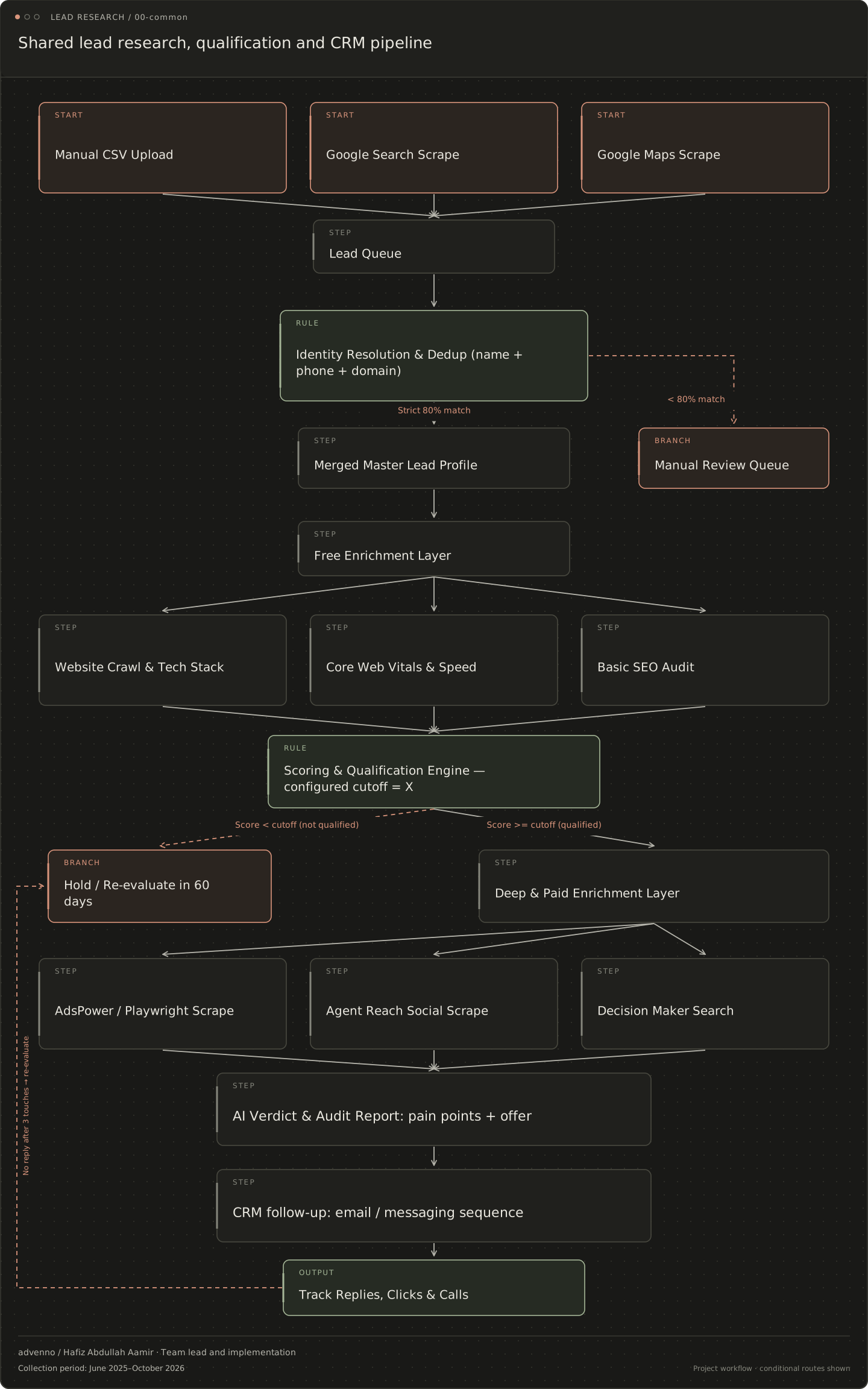
Read the stages and decision branches
- Manual CSV Upload
- Google Search Scrape
- Google Maps Scrape
- Lead Queue
- Identity Resolution & Dedup (name + phone + domain)
- ↳ Strict 80% match: Merged Master Lead Profile
- ↳ < 80% match: Manual Review Queue
- Merged Master Lead Profile
- Manual Review Queue
- Free Enrichment Layer
- Website Crawl & Tech Stack
- Core Web Vitals & Speed
- Basic SEO Audit
- Scoring & Qualification Engine — configured cutoff = X
- ↳ Score < cutoff (not qualified): Hold / Re-evaluate in 60 days
- ↳ Score >= cutoff (qualified): Deep & Paid Enrichment Layer
- Hold / Re-evaluate in 60 days
- Deep & Paid Enrichment Layer
- AdsPower / Playwright Scrape
- Agent Reach Social Scrape
- Decision Maker Search
- AI Verdict & Audit Report: pain points + offer
- CRM follow-up: email / messaging sequence
- Track Replies, Clicks & Calls
- ↳ no reply after 3 touches: Hold / Re-evaluate in 60 days
Compare the architecture across business types
The common pipeline has 26 niche versions. Their operational case studies also contain a separate acquisition map, so readers can distinguish the system that researches prospects from the system built to handle work inside that type of organisation.
- Restaurants: compare a direct-ordering operation with the research signals used to understand that business.
- Hotels: follow booking and pre-arrival operations alongside a hotel-specific research pipeline.
- Recruitment agencies: keep candidate processing separate from employer and agency prospect research.
- Charities: distinguish donor-service workflows from research about an organisation’s public donation journey.
- Membership organisations: compare renewal operations with the signals used in a membership-specific research configuration.
Evaluate usefulness before increasing volume
A sensible evaluation checks duplicate rates, incorrect entity matches, evidence freshness, reviewer corrections and time spent preparing a usable prospect record. Track how many records produce a relevant next action, not just how many rows the workflow creates. Any commercial results need their own measured period and attribution; no conversion improvement is claimed here.
For a first scope, bring a redacted example of an existing lead record, the criteria your team uses to qualify it, the CRM destination and one example of a difficult duplicate. Define which data sources and communication channels are approved. That makes the integration and review work concrete.
Explore workflow automation and AI integration, or discuss a lead-research system with Advenno.